
Decentralized Community Edition Not offered or actively marketed to persons in the European Union or European Economic Area.

Decentralized Bovotrade Community

BOVOBot for KuCoin Futures

A professional trading cockpit for market analysis, Standard Futures, and separately enabled Lead Trade. You define the markets, capital, and limits. BOVOBot evaluates signals, executes through the selected route, and keeps each route's status visible.

Windows PC or server Standard and Lead are separated No withdrawal permission Not available in the EU/EEA Not available in the EU/EEA
2independent KuCoin routes
24/7continuous market monitoring
1shared control center
0withdrawal permissions required

Interactive preview

Chart & Settings

Test the Community Edition defaults directly in your browser and see how capital, leverage, and protection distances affect the preview.

Local simulationReady. The preview uses stored sample data only.

Speed
Download Community Edition
AVAX/USDT
24h preview
Loading chart…
Last price
Open High Low Volume Candles

Lightweight Charts™ Copyright (c) 2025 TradingView, Inc. TradingView

Bovotrade Community

Understand the software together. Keep control of every decision.

Bovotrade is a decentralized community software project. Users share experience and learn how the technology works, while each person runs a local copy, chooses every setting, and retains control of the exchange account, orders, start, and stop.

Runs locally
The website never asks for API keys. The Community Edition is configured on your own Windows system.
No pooled custody
bovotrade.com does not receive customer funds, exchange balances, or withdrawal permissions.
Deliberate start
A download does not start trading. The Standard route can operate only after local review and a manual start.
Decentralized
Bovotrade is an independent community project with no centralized custody and is not an operator or official representative of the exchanges named on this website.
Region
The Community Edition is not provided or actively marketed to persons in the EU or EEA.

The product

Automation that remains transparent.

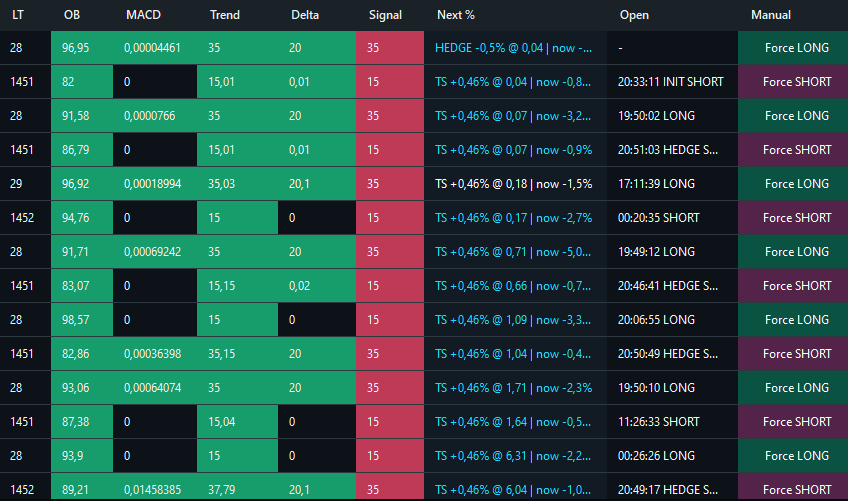
BOVOBot brings analysis, execution, and monitoring together. The cockpit shows the market, signal assessment, positions, open orders, and active route status without hiding the decision process behind a single Start button.

Market analysis
Trend, momentum, volatility, and additional indicators contribute to a consistent SignalScore.
Route and execution
Standard Futures and Lead Trade use separate credentials, states, and order paths.
Protection and control
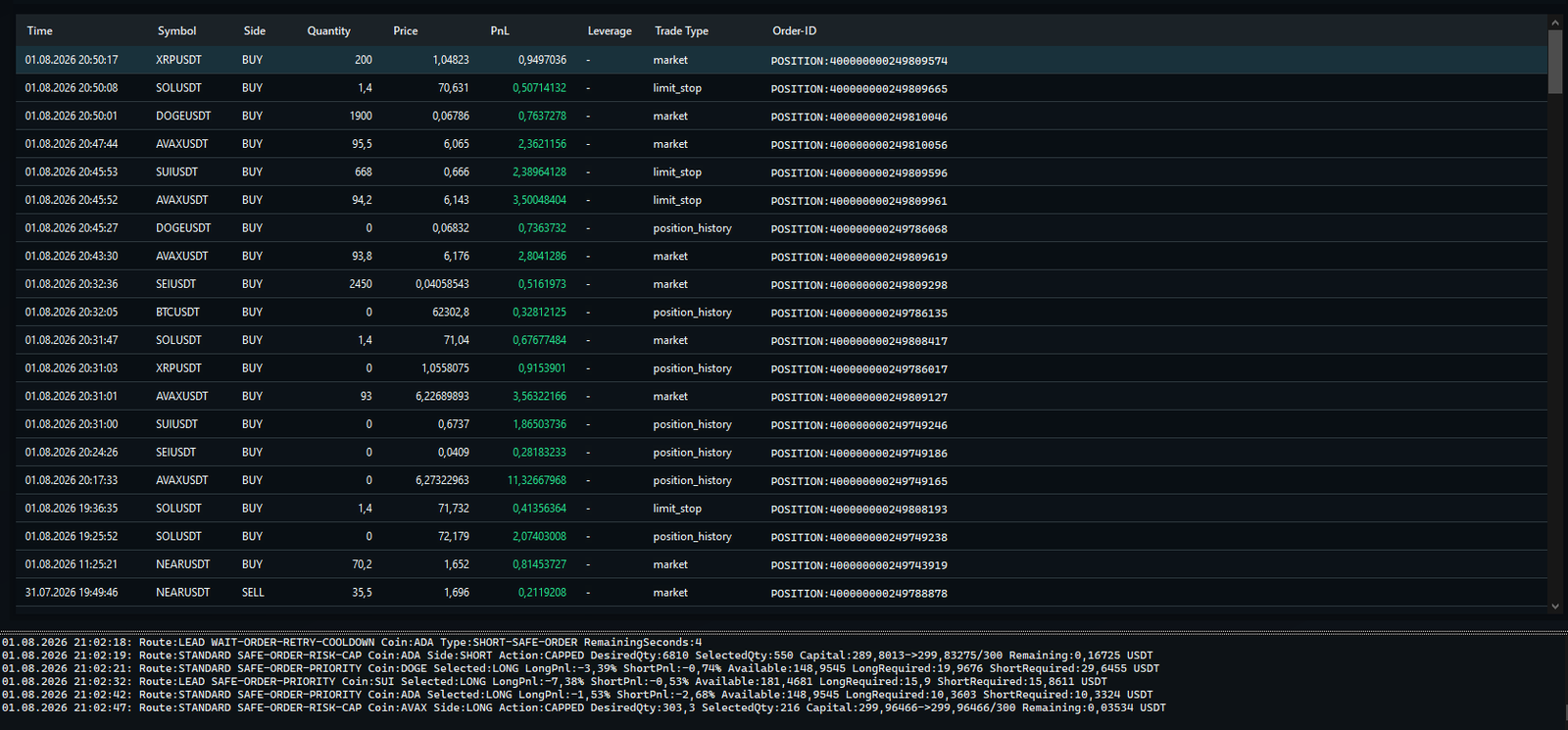
Positions, open orders, and configured protection measures remain visible together.
Evaluation
Charts, live tests, backtests, and learning metrics help you assess behavior and settings.
View all features
BOVOBotKuCoin Futures cockpitRoute ready
BOVOBot interface with multiple coin positions, chart, and KuCoin Futures status
Real BOVOBot desktop interface

How BOVOBot works

A clear process from market data to position control.

Every step has a defined purpose. A signal alone does not trigger an uncontrolled order.

  1. 01
    Capture market data

    Price, Kline, and indicator data are updated for enabled markets.

  2. 02
    Evaluate the setup

    Multiple conditions are combined into a Long or Short context.

  3. 03
    Check limits

    Route, capital, position limit, market enablement, and additional rules must all align.

  4. 04
    Execute the order

    The order is sent through the active route. Lead orders also require a fixed broker attribution.

  5. 05
    Monitor the position

    The position, open orders, protection status, and exchange response remain part of continuous monitoring.

More than a basic trading bot

Why BOVOBot works differently.

Basic bots often react to a single signal or a fixed price grid. BOVOBot combines multiple decision and control layers in a visible workflow.

Comparison itemBOVOBotBasic signal or grid bot
DecisionMultiple indicators and market conditions in the SignalScoreOften a single signal or fixed grid
ExecutionSeparate Standard and Lead routes with their own statusOne shared order path
MonitoringPositions, open orders, and protection status in one interfaceOften limited to start, stop, and result
ConfigurationMarket, capital, signal, and protection parameters for each operating profileLimited global parameters
EvaluationChart, live test, backtest, and learning metrics in one contextUsually a basic trade history
Lead TradeFixed broker attribution and supporter authorizationNo separate authorization and broker check

Two KuCoin routes

One interface, two clearly separated routes.

Both routes can operate in parallel while retaining separate credentials, states, and order contexts.

Standard

KuCoin Standard Futures

For regular Futures access with its own API connection, enabled markets, and risk limits.

  • Independent API access
  • Separate position and order status
  • Configurable operating profile
Supporter

KuCoin Futures Lead Trade

For authorized supporter accounts. Every Lead order must carry the active partner and broker attribution.

  • Separate Lead credentials
  • Main-account authorization check
  • Mandatory broker attribution

Controlled setup

Configure settings in the right order.

A professional configuration starts with the account and route. Capital, markets, signals, and automation follow only after that.

Open settings guide
  1. 01
    Account and route

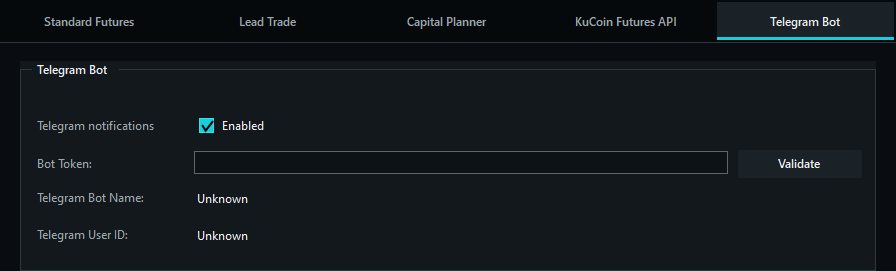
    Connect Standard or Lead and validate access.

  2. 02
    Capital and limits

    Set limits for order size, leverage, and maximum positions.

  3. 03
    Markets and signals

    Define the whitelist, direction, and entry thresholds.

  4. 04
    Protection and control

    Review the protection logic and closely observe the first run.

Quick answers

Important questions before the first start.

Can BOVOBot guarantee profits?

No. BOVOBot structures analysis and execution, but it cannot eliminate market or loss risk.

Which API permissions does the bot need?

Only the permissions required for market data and Futures trading. Withdrawal permissions remain disabled.

What is the difference between Standard and Lead?

Standard Futures uses regular KuCoin access. Lead Trade uses a separate API route and is reserved for authorized supporter accounts.

Can BOVOBot run on a server?

Yes. A Windows PC or Windows Server with a stable connection is suitable. The interface remains available for monitoring and configuration.

View all questions and answers

Important before you start

Automation does not replace risk management.

Crypto and Futures trading can result in substantial losses. BOVOBot does not promise profits. Start with clearly defined limits and review both the bot and exchange account regularly.

Read the risk disclosure

Bovotrade Suite

Three exchange sections, one clear release status.

KuCoin BOVOBot is the available product section. The Gate.io and Bybit editions are in development and currently have neither an enabled API connection nor a download.

Explore BOVOBot

Start with understanding, not maximum automation.

Review the workflow, settings, and risk limits first. You can then prepare the first run in a controlled way.